
You have something real to teach. Maybe you are a fitness coach with a method that actually works. Maybe you are a business strategist who has helped dozens of companies grow. Maybe you are a therapist building a course to reach people beyond your private practice.
You have narrowed it down to two platforms: Kajabi and Teachable.
Both names come up constantly. Both have loyal users. Both have changed a lot over the years. And the comparison posts you have been reading? Most of them are outdated, affiliate-driven, or written by someone who has never actually built a business on either platform.
We are going to fix that.
We are Kajabi, so yes, we have a perspective here. But we are going to be straightforward about what each platform does well, where each one falls short, and who each one is actually built for. If Teachable is the better fit for you, we will say so.
Let's get into it.
The Core Difference: Course Platform vs Business Operating System
This is the most important distinction, and everything else flows from it.
Teachable was built as a course platform. It does that specific job. You can create courses, enroll students, and process payments. Over the years, Teachable has added features around the edges, but its center of gravity is still course delivery.
Kajabi was built as a business platform for knowledge entrepreneurs. Courses are one product type among several. On Kajabi, you also build your website, send email campaigns, create sales funnels, run a coaching practice, host a community, manage affiliates, and accept payments. All in one place. All connected.
Think of it this way: Teachable is a classroom. Kajabi is the entire school building, the admissions office, the marketing department, and the campus store.
Neither approach is wrong. But they serve different stages and different ambitions.
Feature-by-Feature Breakdown
Courses
Teachable has a solid course builder. You can upload videos, create quizzes, issue completion certificates, and drip content on a schedule. The student experience is clean. If all you need is a place to host a course and collect payments, Teachable handles that.
Kajabi offers course creation with drip scheduling, cohort-based delivery, video chapters, and assessments. But the key difference is what surrounds the course. Because your email marketing, sales pages, community, and automations all live on the same platform, your course is not a standalone product. It is part of a connected business. A student finishes Module 3 and automatically gets an email offering a coaching upsell. A community member engages with a challenge and receives a course recommendation. The course is woven into the whole experience.
Bottom line: Both build good courses. Kajabi connects the course to everything else.
Course Structure
Teachable lets you organize a course into sections and lectures, but there's no way to nest content further. For a small course, that's plenty. For a course with real depth, it can get flat and hard to navigate.
Kajabi lets you nest subcategories inside categories, so you can organize dense course content the way a student actually needs to move through it, instead of one long scrolling list.
Bottom line: If your course content is extensive, Kajabi's deeper structure keeps it organized. For a simple, single-topic course, either platform works.
Assessments and Quizzes
Teachable supports multiple-choice quizzes, and whether they're graded depends on your plan tier. Open-ended questions and file-upload answers aren't supported.
Kajabi supports multiple-choice, open-ended, and fill-in-the-blank questions, plus file uploads (PDFs, images, audio, video) as answers. Grading is included on every plan, and you can trigger automated emails or tag students based on how they score.
Bottom line: If testing and interactive assessment are part of how you teach, Kajabi gives you more ways to evaluate students than simple multiple-choice.
Video Hosting
Both platforms host your course videos on Wistia, so streaming quality, adaptive playback, and hosting limits are effectively the same either way. This one's a wash — look at the other features here to make your decision.
Student Progress Tracking
Teachable shows individual student progress, including quiz scores, completed lectures, and a video heat map showing where viewers rewatch or drop off.
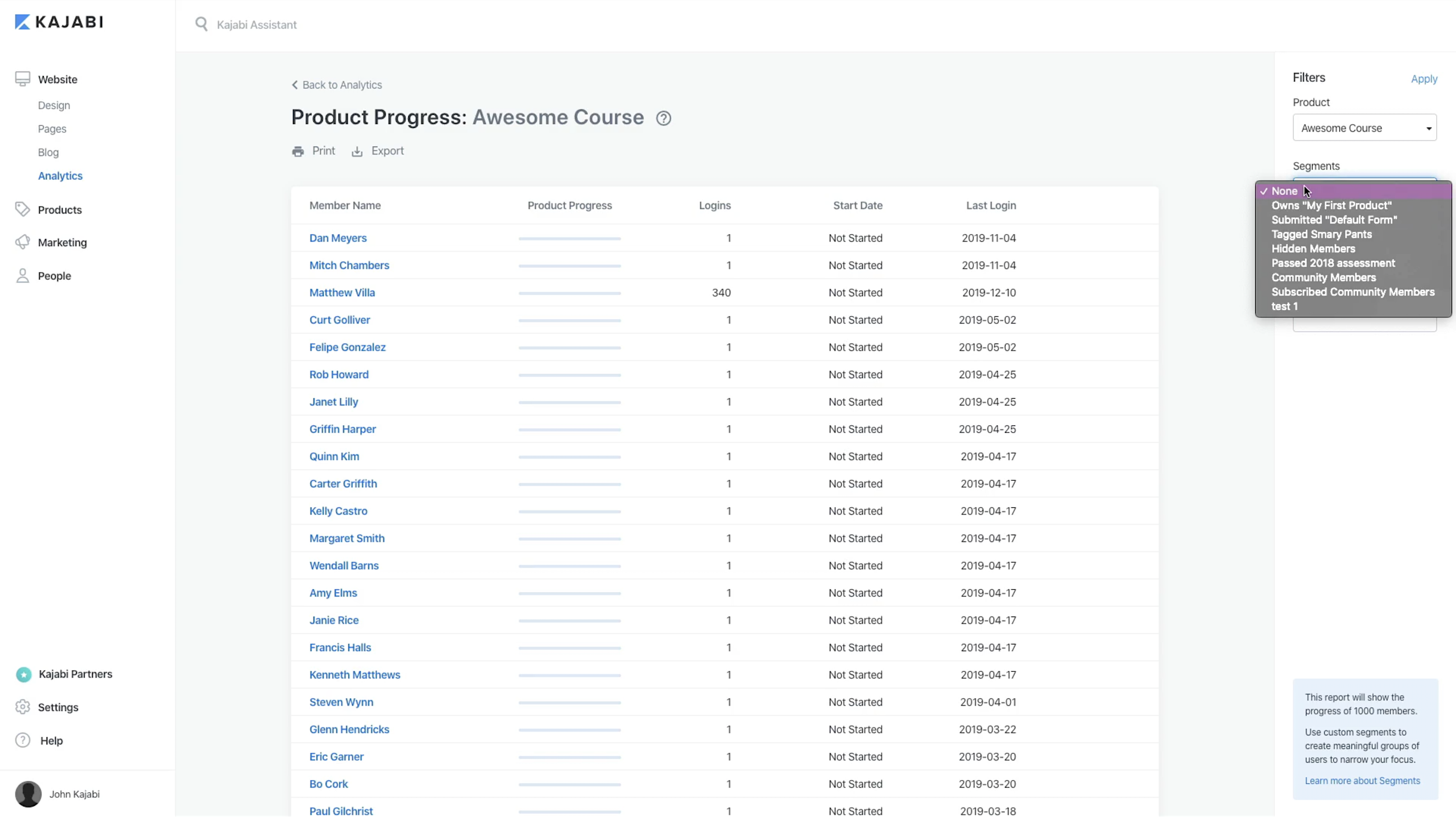
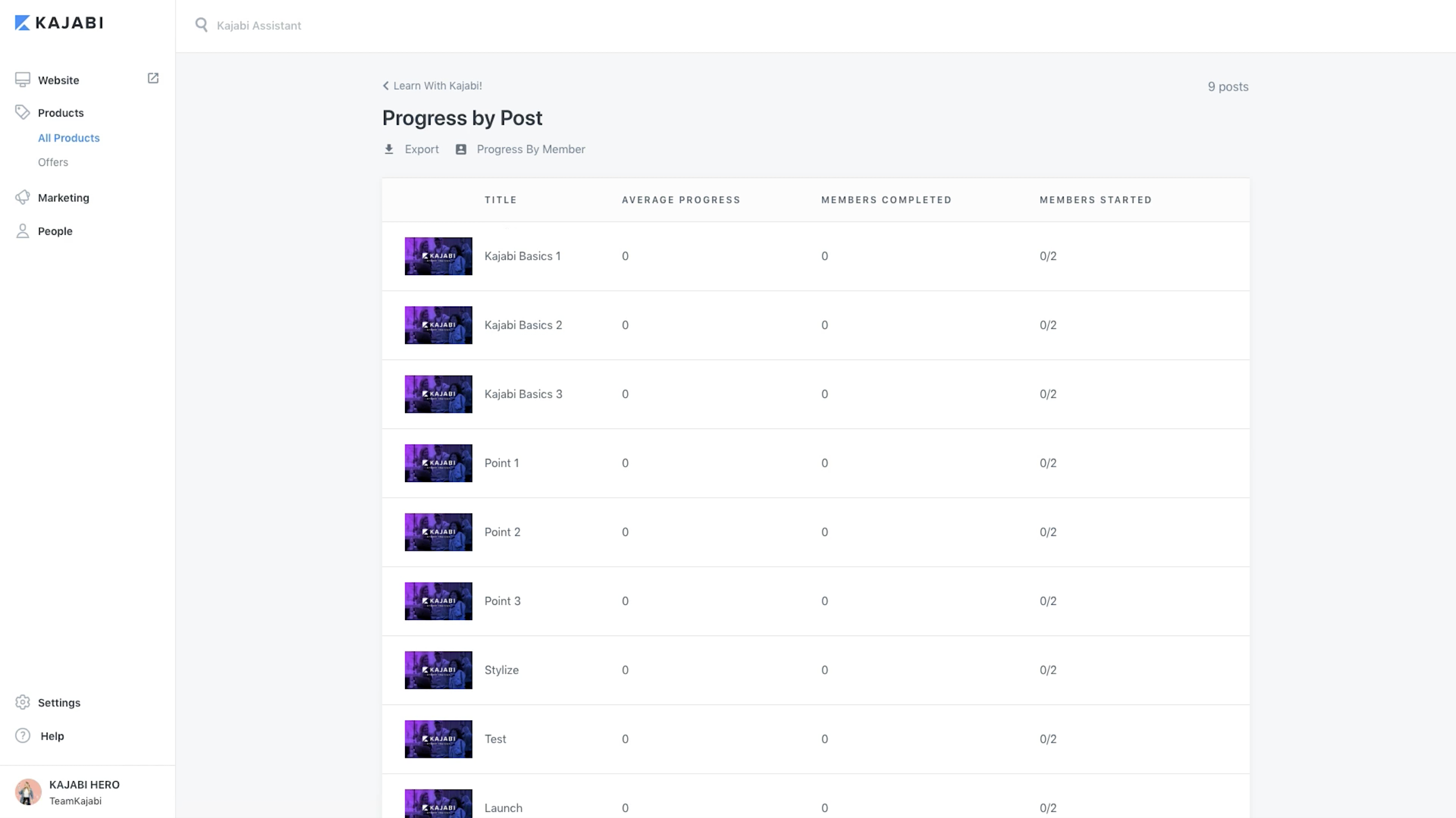
Kajabi offers the same kind of video heat map data, plus segment-level reporting: you can filter progress by group (your community members, for example) or view completion lesson-by-lesson across your whole audience, not just one student at a time.
Bottom line: Both show you how individual students are doing. Kajabi adds the ability to zoom out and see patterns across segments of your audience.
Coaching
Teachable now offers a native coaching product: milestone-based 1:1 programs with intake forms, client management, and payments through Teachable checkout. But scheduling and the actual calls still run through connected Calendly and Zoom accounts rather than a built-in calendar, and there's no group coaching or cohort format.
Kajabi has a full coaching product built in. You can offer 1:1 coaching, group coaching, or both. Scheduling is native. Payments are handled through Kajabi Payments. You set your session structure, your pricing, your availability, and clients book and pay without leaving your site.
Bottom line: Teachable's coaching tool covers 1:1 programs but still leans on Calendly and Zoom for scheduling and calls, and skips group coaching entirely. Kajabi handles scheduling, payments, and both 1:1 and group formats natively.
Community
Teachable now includes a built-in community feature on the Basic plan and up: students can post and reply in threads across categories you define, with access controlled by student, course, or membership tier. It's basic, though — no gamification (points, badges, streaks), no direct messaging between members, and no access-group segmentation for different tiers.
Kajabi includes a full community product with discussions, member badges, challenges, an events calendar, and engagement tracking. Your community members, course students, and coaching clients all exist in one system. You can see who is engaged, who is dropping off, and what content resonates.
Bottom line: Both platforms now include community. Kajabi's is more developed, with gamification, direct messaging, and access-group segmentation that Teachable's built-in version doesn't have.
Email Marketing
Teachable has basic email functionality. You can send broadcast emails to your students. But for real email marketing (automated sequences, segmentation, behavioral triggers, A/B testing), you will need a third-party tool like Mailchimp, ConvertKit, or ActiveCampaign.
Kajabi includes a full email marketing system with broadcast emails, automated sequences, visual automation builders, smart branching based on subscriber behavior, tagging, and segmentation. You can build an entire email strategy without leaving Kajabi. No integration headaches. No syncing contacts between platforms. No extra monthly cost.
Bottom line: Email is the backbone of an online business. Kajabi includes it. Teachable requires you to pay for and integrate a separate tool.
Funnels and Landing Pages
Teachable offers basic sales pages for your courses. They are functional but limited in customization. For more sophisticated landing pages or multi-step sales funnels, you will need a separate tool like ClickFunnels, Leadpages, or Unbounce.
Kajabi includes a full funnel builder and landing page system. You can build opt-in pages, sales pages, upsell sequences, and thank-you pages. Templates are included, and the builder supports custom designs. Your funnels connect directly to your products, email automations, and payment processing.
Bottom line: Funnels convert browsers into buyers. Kajabi builds them natively. Teachable needs third-party help.
One more difference worth flagging: Teachable doesn't offer any CRM functionality, so tracking and segmenting the leads your landing pages generate means adding a separate CRM tool. Kajabi's CRM is built in — you can tag, segment, and filter contacts, and trigger emails or product access based on their behavior, without leaving the platform.
Payments
Teachable processes payments through Stripe and PayPal. You will need to set up your own Stripe account, connect it, and manage payment processing externally. Teachable also takes a transaction fee on its Starter plan (7.5%); the Builder and Growth plans carry no platform transaction fee, just standard card processing.
Kajabi offers Kajabi Payments, a built-in payment processor. You do not need to set up a separate Stripe account (though you can use Stripe if you prefer). No transaction fees on any paid plan. Support for one-time payments, subscriptions, payment plans, and free trials. All payments, refunds, and revenue reporting live in your Kajabi dashboard.
Bottom line: Kajabi simplifies payment setup and does not charge transaction fees. Teachable requires more setup and charges fees on lower plans.
AI Tools
Teachable has introduced some AI-assisted features for course creation. These are helpful for generating outlines and lesson content.
Kajabi includes Cofounder, an AI business partner built into the platform at no extra cost. Cofounder does not just help with content. It helps you plan your business model, structure your offers, write sales copy, set pricing, and think through strategy. It is trained on what works for knowledge businesses specifically. Think of it as a consultant who is available at 2 AM when you are building out your next launch.
Bottom line: Both platforms have AI features. Kajabi's Cofounder goes deeper, covering business strategy, not just content generation.
Mobile App
Teachable offers a mobile app for students to consume course content.
Kajabi offers a branded mobile app. Your app. Your brand name. Your icon in the App Store. Your students, community members, and coaching clients access everything through an app that looks and feels like yours. This matters because a branded app builds legitimacy and keeps your audience inside your ecosystem.
Bottom line: Teachable has a mobile app. Kajabi gives you your own branded app.
Website Builder
Teachable does not include a website builder. You get sales pages for your courses, but your main website needs to live elsewhere (WordPress, Squarespace, etc.).
Kajabi includes a full website builder with customizable themes, a blog, and custom pages. Your entire online presence, from homepage to blog to course catalog to checkout, lives under one roof.
Bottom line: Kajabi replaces your website builder. Teachable does not have one.
Product Templates and Theming
Teachable applies one template across all of your products — you can swap the logo, one sitewide font, and a few section colors, but every course and product ends up looking the same.
Kajabi gives each product its own customizable template, so a course, a membership site, and a coaching offer can each have a distinct look, built from a library of presets and refined with a template editor.
Bottom line: If you sell more than one type of product, Kajabi lets each one look and feel distinct. Teachable makes everything look the same.
Customization
Teachable covers the basics: logo, background image, one sitewide font, and colors for a handful of elements. Deeper customization requires the Power Editor, which means hand-coding HTML/Liquid and CSS.
Kajabi offers drag-and-drop customization across layouts, branding, and per-product themes without touching code, with a custom code editor available if you want to go further.
Bottom line: Kajabi covers more ground without code. Teachable's deeper customization is developer territory.
Affiliate Program Management
Teachable supports affiliate marketing on its higher-tier plans.
Kajabi includes affiliate program management where you can recruit affiliates, set commission structures, track referrals, and automate payouts. This is available across plans, giving you a built-in growth channel from day one.
Bottom line: Both offer affiliate tools, but Kajabi makes it available more broadly.
Live Events and Webinars
Teachable has no native livestreaming feature. You can embed a live video stream into a lesson to run a webinar for existing students, but there's no way to use it to reach a new audience or plug it into a marketing sequence.
Kajabi includes built-in event hosting for live trainings, virtual summits, and evergreen (automated, repeating) webinars, complete with a full funnel: registration page, confirmation page, sales page, and reminder and follow-up emails, all connected to the rest of your marketing.
Bottom line: If webinars or live events are part of how you sell, Kajabi treats them as a growth channel. Teachable treats them as a bonus for students you already have.
Integrations
Teachable connects with a handful of core tools — analytics, email platforms, and Zapier — to extend what the platform does natively.
Kajabi supports a wider range of native integrations across analytics, email marketing, and ad tracking, including a one-paste Facebook Pixel setup versus manually embedding pixel code into every course on Teachable.
Bottom line: Because Kajabi already includes most of what you'd otherwise need a third-party tool for, its integrations mostly extend an already-complete toolkit. Teachable's integrations are more often filling gaps.
Support
Both platforms offer help documentation and email support. Kajabi backs that up with 24/7 live chat, so you're not stuck waiting on an email reply if something breaks the night before a launch.
Bottom line: If round-the-clock help matters to you, Kajabi's live chat is the difference-maker.
Security
Both platforms use SSL encryption and are PCI-compliant, so payment and account data are protected in transit either way.
Kajabi adds two-factor authentication, automated backups, and granular user permissions on top of that baseline, and is GDPR-compliant for international businesses.
Teachable is also GDPR-compliant and runs a dedicated fraud-detection team that monitors transactions for suspicious activity.
Bottom line: Both platforms meet the baseline. Kajabi gives you more account-level protection (two-factor authentication, backups, permissions); Teachable's edge is active fraud monitoring on transactions.
The Comparison Table
| Feature | Kajabi | Teachable |
|---|---|---|
| Online courses | Yes (drip, cohorts, video chapters) | Yes (drip, quizzes, certificates) |
| Coaching (1:1 and group) | Yes, built-in with scheduling and payments | Yes, 1:1 only (relies on Calendly/Zoom for scheduling and calls) |
| Community | Yes (discussions, badges, challenges, calendar) | Yes, basic (no DMs, gamification, or access groups) |
| Email marketing | Yes (automations, sequences, smart branching) | Basic broadcasts only; full email requires add-on |
| Sales funnels | Yes, built-in funnel builder | No (requires third-party tool) |
| Landing pages | Yes, full page builder | Basic sales pages only |
| Payments | Kajabi Payments built-in, 0% transaction fees | Stripe/PayPal required, transaction fees on lower tiers |
| AI tools | Cofounder (business strategy, copy, pricing) | AI course creation assistance |
| Branded mobile app | Yes | No (shared Teachable app) |
| Website builder | Yes, full website with blog | No |
| Affiliate management | Yes | Yes (higher tiers) |
| Starting price | $179/mo, or $143/mo billed annually (Basic) | $39/mo, or $29/mo billed annually (Starter) |
The Pricing Reality
Let's talk money, because this is where the conversation gets interesting.
Teachable's Starter plan starts at $39/mo ($29/mo billed annually), plus a 7.5% transaction fee on every sale, and caps you at 100 active students and 5 products. Kajabi's Basic plan starts at $179/mo ($143/mo billed annually), with no platform transaction fee, 2,500 contacts, and 5 products. On the surface, Teachable looks a lot cheaper.
But here is what happens in practice.
On Teachable's Starter plan, you get course hosting and basic sales pages. To run a real business, you will likely need:
- An email marketing platform: $29 to $79/mo depending on your list size
- A landing page or funnel builder: $29 to $97/mo
- A community platform: $39 to $99/mo
- A scheduling tool for coaching: $10 to $20/mo
- A website builder: $12 to $40/mo
Add those up and you are looking at $158 to $374/mo on top of Teachable's base plan, plus the headaches of connecting everything together, keeping contacts in sync, and troubleshooting when integrations break. And if you want to drop that 7.5% transaction fee, Teachable's Builder plan (0% fee, 1,000 active students, 10 products) runs $89/mo, or $69/mo billed annually.
On Kajabi's Basic plan at $179/mo ($143/mo billed annually), all of that is included: a website, community, email marketing, funnels, and payments with no platform transaction fee. One login. One bill. One support team. Everything connected.
And right now, Kajabi is running a special offer: 3 months for $99. That is $33/mo to test everything out.
The cheapest option is not always the most affordable option. Total cost of ownership matters.
Who Should Choose Teachable
Be honest here. Teachable is a good choice if:
- You only need to sell courses. Not coaching. Not community. Just courses.
- You already have an email marketing tool, a website, and a funnel builder that you like and do not want to switch.
- You are testing a single course idea and want the lowest possible entry price to validate it.
- You are comfortable managing multiple tools and integrations.
Teachable does what it does well. If your business is simple and course-only, it can work.
Who Should Choose Kajabi
Kajabi is built for you if:
- You want to build a real business around your expertise, not just sell a course.
- You plan to offer coaching, community, courses, or any combination.
- You want email marketing, funnels, and payments in one place.
- You do not want to play systems integrator and would rather focus on your content and your clients.
- You want a branded mobile app and a professional website.
- You want AI-powered business strategy help through Cofounder.
- You want to start with one offer and scale into multiple revenue streams over time.
Most knowledge entrepreneurs do not stay in the "one course" phase forever. They add coaching. They build community. They launch new products. Kajabi is built for that trajectory.
How to Set This Up in Kajabi
If you are leaning toward Kajabi, here is what your first week looks like:
Day 1: Account and Foundation Sign up for Kajabi (the 3 months for $99 offer is available now). Choose a website theme. Set up your branding: logo, colors, fonts. Connect your domain or use a Kajabi subdomain to start.
Day 2: Build Your First Product Go to Products and create your first offer. If you are starting with a course, use the course builder. If coaching, set up a coaching product with your session structure and availability. Upload your content or outline your sessions.
Day 3: Set Up Payments Activate Kajabi Payments. Set your pricing (one-time, subscription, or payment plan). No Stripe account needed, though you can connect one if you prefer.
Day 4: Create Your Sales Page Use the page builder to create a sales or landing page for your product. Kajabi has templates you can customize, or you can build from scratch.
Day 5: Build Your First Email Sequence Go to Marketing and set up a welcome sequence for new subscribers and a sales sequence for your product. Use automations to connect the pieces: someone opts in, they get the welcome sequence, then the sales sequence.
Day 6: Launch Your Funnel Connect your landing page, email sequence, and product into a funnel. Test the flow end-to-end. Make sure payments process correctly.
Day 7: Open for Business Share your funnel link. Tell your audience. You are live.
If you get stuck at any step, open Cofounder. It can help you write your sales page, structure your offer, set your pricing, and plan your launch. It is like having a business advisor on call.
Pro Tips
Start with one product, not five. The biggest mistake new creators make is trying to launch a course, a coaching program, and a community all at once. Pick the one that matches your audience's most urgent need. Nail it. Then expand.
Use automations from day one. Even simple automations (welcome emails, post-purchase follow-ups) make your business feel professional and save you time. You do not need complex funnels right away. Just connect the dots.
Look at total cost, not sticker price. If you are comparing platforms, add up everything you will actually pay across all the tools you need. The cheapest plan is not the cheapest solution.
Try Cofounder before you hire a consultant. Before paying someone $500 to help you structure your offer or write your sales page, try Cofounder. It is included in your Kajabi plan, and it is specifically trained on what works for knowledge businesses.
Do not overlook community. Courses have a completion problem. Most students do not finish. Community solves that by creating accountability, connection, and ongoing engagement. Even a simple discussion space alongside your course can dramatically improve outcomes.
If you're a coach: Kajabi vs Teachable for coaching businesses
Everything above applies broadly, but if coaching is your business model specifically, the comparison gets more concrete. Coaching isn't just courses. You need scheduling, payment plans, community space, client management, email automation, and a way to handle one-on-one and group sessions without duct-taping five tools together.
Most coaching businesses run some combination of:
- One-on-one sessions (premium, limited capacity)
- Group coaching programs (leveraged, time-bound)
- Courses (evergreen, scalable)
- Community (ongoing, retention-focused)
- Email sequences (nurture, sales, onboarding)
A coach's platform needs to handle all of this natively, or you're paying for and managing multiple tools.
Scheduling and session management
Kajabi's coaching product includes built-in scheduling with calendar sync, session notes, and payment collection tied directly to your coaching offer. One-on-one and group sessions live inside the same product your clients access their course content and community.
Teachable's coaching product handles milestones, intake forms, client management, and payments natively, but scheduling and the actual call still run through connected Calendly and Zoom accounts, not a built-in calendar. It's also built for 1:1 programs only, with no group coaching or cohort format.
Client community
Kajabi has a native community product. Audio posts, badges, calendar views, threaded discussions. Your coaching clients can access their course, book sessions, and participate in community ... all without leaving Kajabi.
Teachable added a basic community feature, but it's limited compared to purpose-built options. Many Teachable coaches use Circle or Mighty Networks alongside Teachable, which adds cost and fragments the client experience.
Bottom line: If coaching is your business, Kajabi handles scheduling, sessions, and community natively, with group coaching support Teachable lacks. Teachable's coaching tool covers the basics for 1:1 programs but still needs Calendly and Zoom bolted on for scheduling and calls.
Start Building
You have expertise that people need. The platform question is really a business question: do you want a course tool, or do you want a business platform?
If the answer is a business platform, Kajabi is built for you.
Build your first product this week.

.webp)

.webp)
![Easiest Website Builders For Beginners: Reviewed And Rated [2025]](https://cdn.prod.website-files.com/693317e747432cd054b3bdcd/6a00f69a7dfde5ea2013c486_6941e2f15bc5c987eb1cffdc_672940523abcd7d1bc29c583_Thumbnail-Easiest-Website-Builders-For-Beginners.webp)